Fixed cash risk
Define a fixed monetary risk amount per trade in your account currency. The EA automatically calculates the appropriate lot size from the current stop-loss distance.
The exact same trading logic as our XAU Momentum indicator for TradingView and strategy for NinjaTrader 8 — now executed automatically as an Expert Advisor in MetaTrader 5. XAU Pulse checks the daily entry window in gold (XAUUSD · M5), executes valid setups with precision, and manages stop-loss and exits by strict rules — ideal for personal accounts and prop firm challenges.
Official MQL5 Market listing · Includes a free demo for the MT5 Strategy Tester.
XAU Pulse runs on the exact same trading logic as the TradingView and NinjaTrader 8 versions: no hours spent staring at the M5 chart, just a clearly defined daily entry window and two momentum horizons that must point in the same direction.
The EA monitors the gold market specifically during the configured daily time window. All times refer to your broker’s server time and can be adjusted to match your setup.
Using completed M5 candles, the EA compares two momentum horizons. Only when both clearly confirm long or short is a setup approved — if they conflict, the EA stays flat.
When a valid setup forms, the EA opens at most one new position per day. Stop-loss, profit target, optional trailing stop, and a timed exit manage the trade from start to finish.
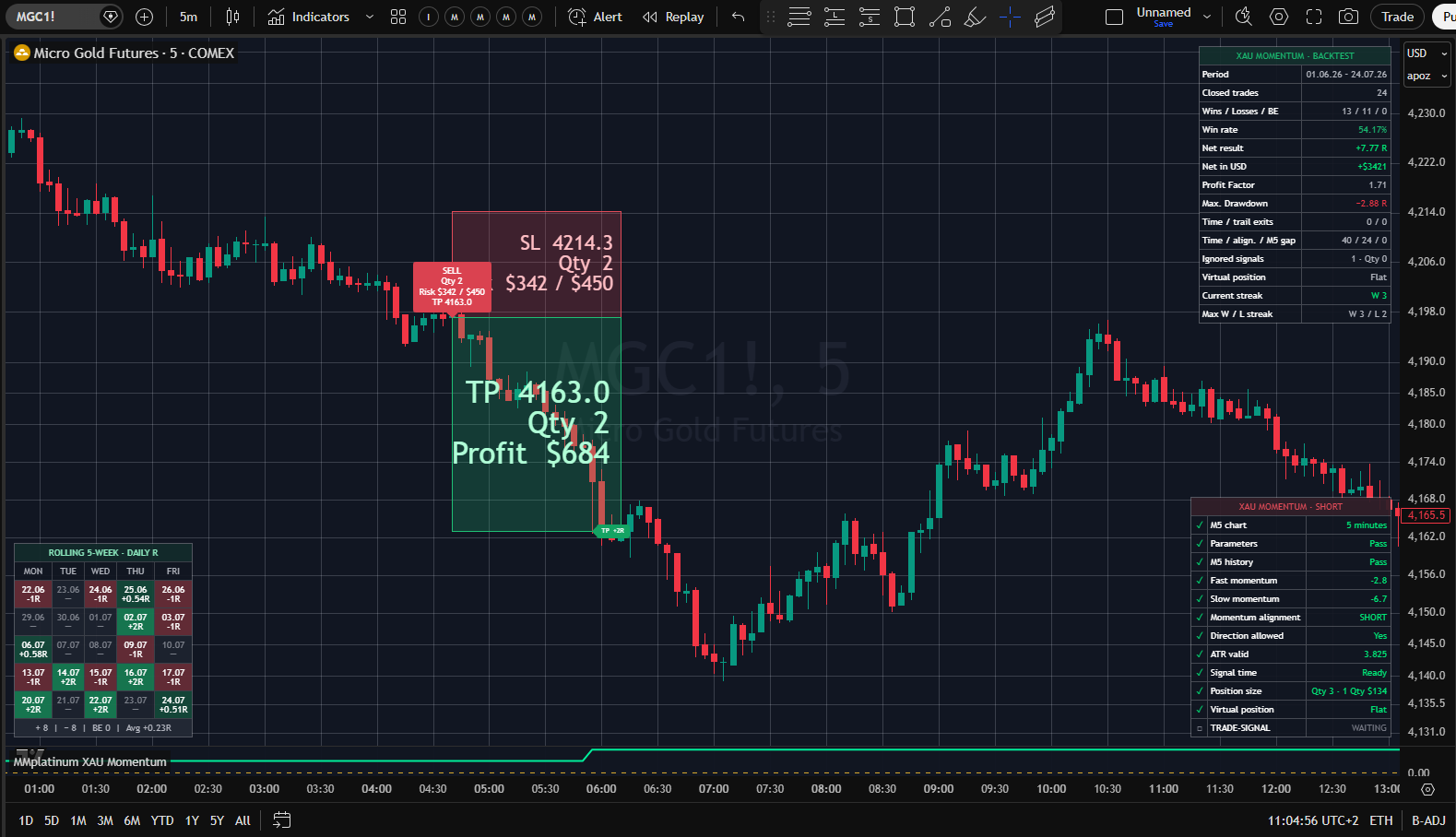
Full risk control for personal live accounts and prop firm challenges: choose upfront how your position size is calculated — via a fixed cash risk amount, a percentage of your account (ideal for strict drawdown rules), or a fixed lot size.
Define a fixed monetary risk amount per trade in your account currency. The EA automatically calculates the appropriate lot size from the current stop-loss distance.
Dynamic position sizing based on account balance, equity, or free margin — ideal for keeping per-trade risk (e.g., 0.5% or 1%) strictly aligned with prop firm drawdown limits.
Set a constant trading volume directly. Monetary risk per trade will then vary according to the volatility-based stop distance.
The initial stop-loss automatically adapts to current XAUUSD market volatility. Both stop-loss and take-profit orders are placed directly on the broker’s server.
The default profit target is set at twice the initial stop distance (2R). Optional trailing stop and timed exit rules can adjust the final realized reward-to-risk ratio.
Optional R-based trailing stop to lock in progress, a timed exit, and separate enablement controls for long and short setups.
Built for prop firms & strict risk discipline: No grid, no martingale, no loss averaging or recovery logic, and no position stacking — at most one new trade per day and only one open position at a time.
All five original views from the official MQL5 listing: the MMplatinum Trading Journal breakdown alongside the MT5 equity curves and Strategy Tester reports at 1% and 3% risk per trade — drawdowns included.
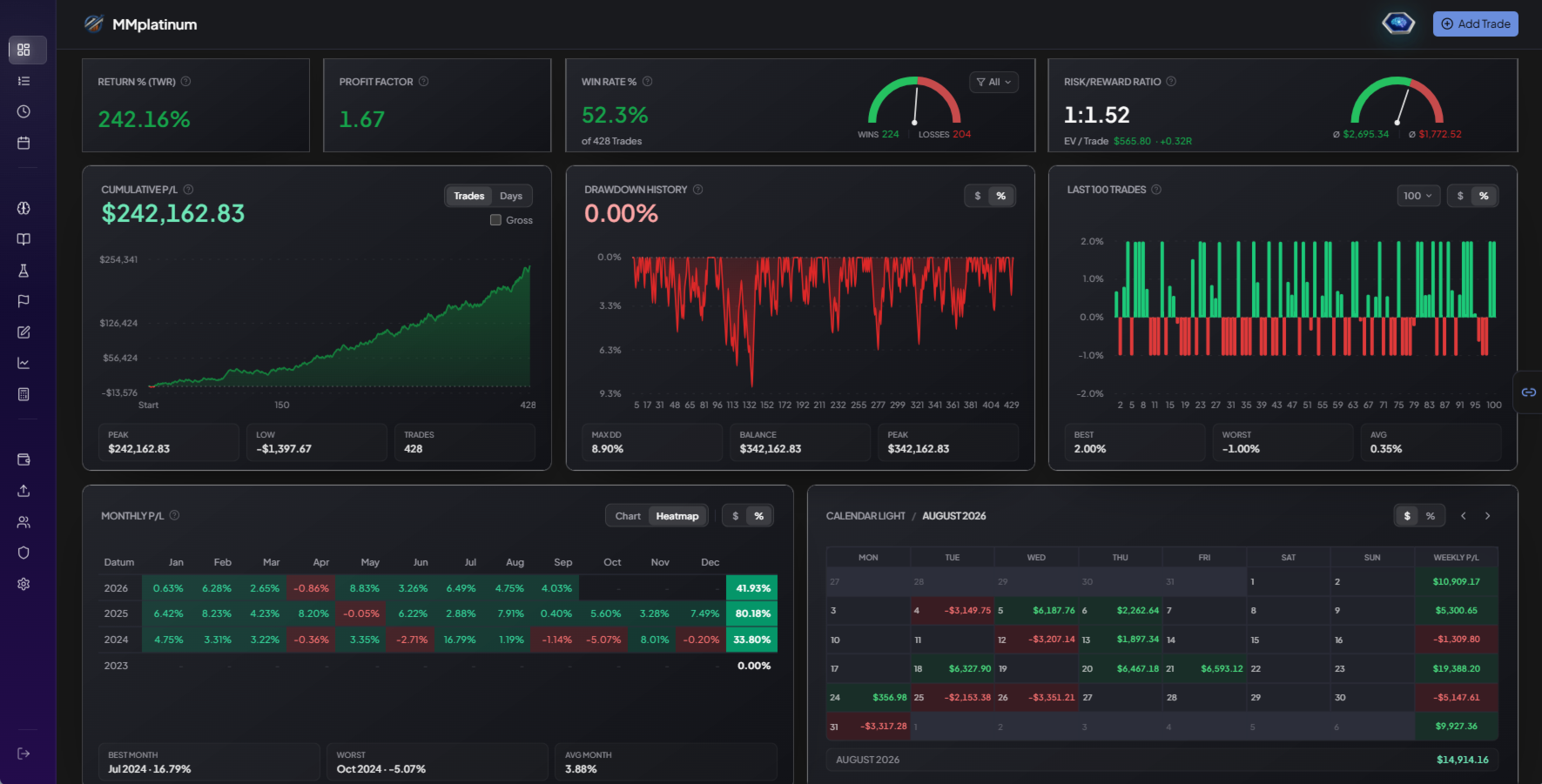
Equity, drawdown and monthly results at a glance. The original XAU Pulse analysis from the MQL5 listing.
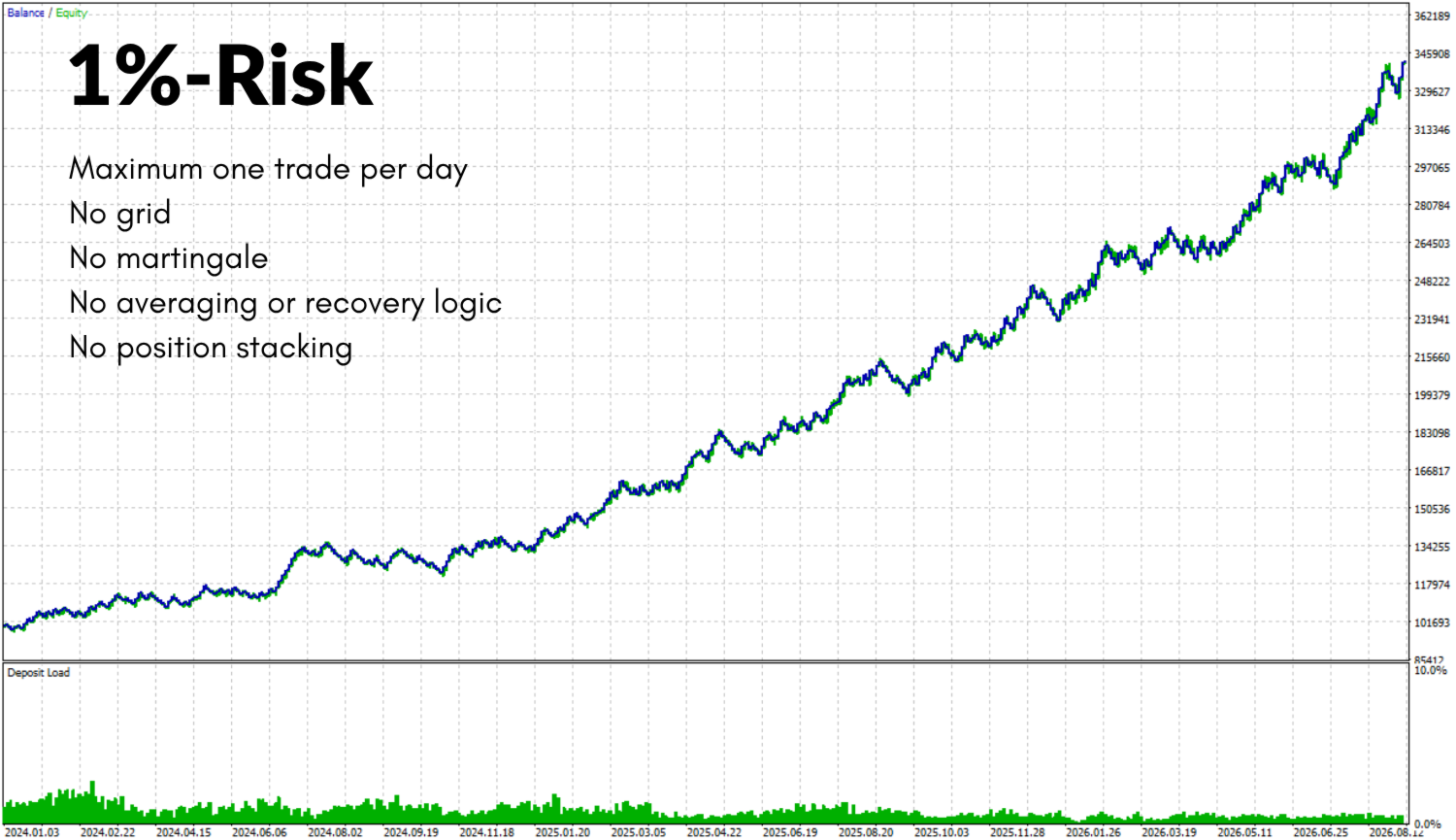
Historical MT5 test with 1% risk per trade. Balance, equity and deposit load show the development over the test period.
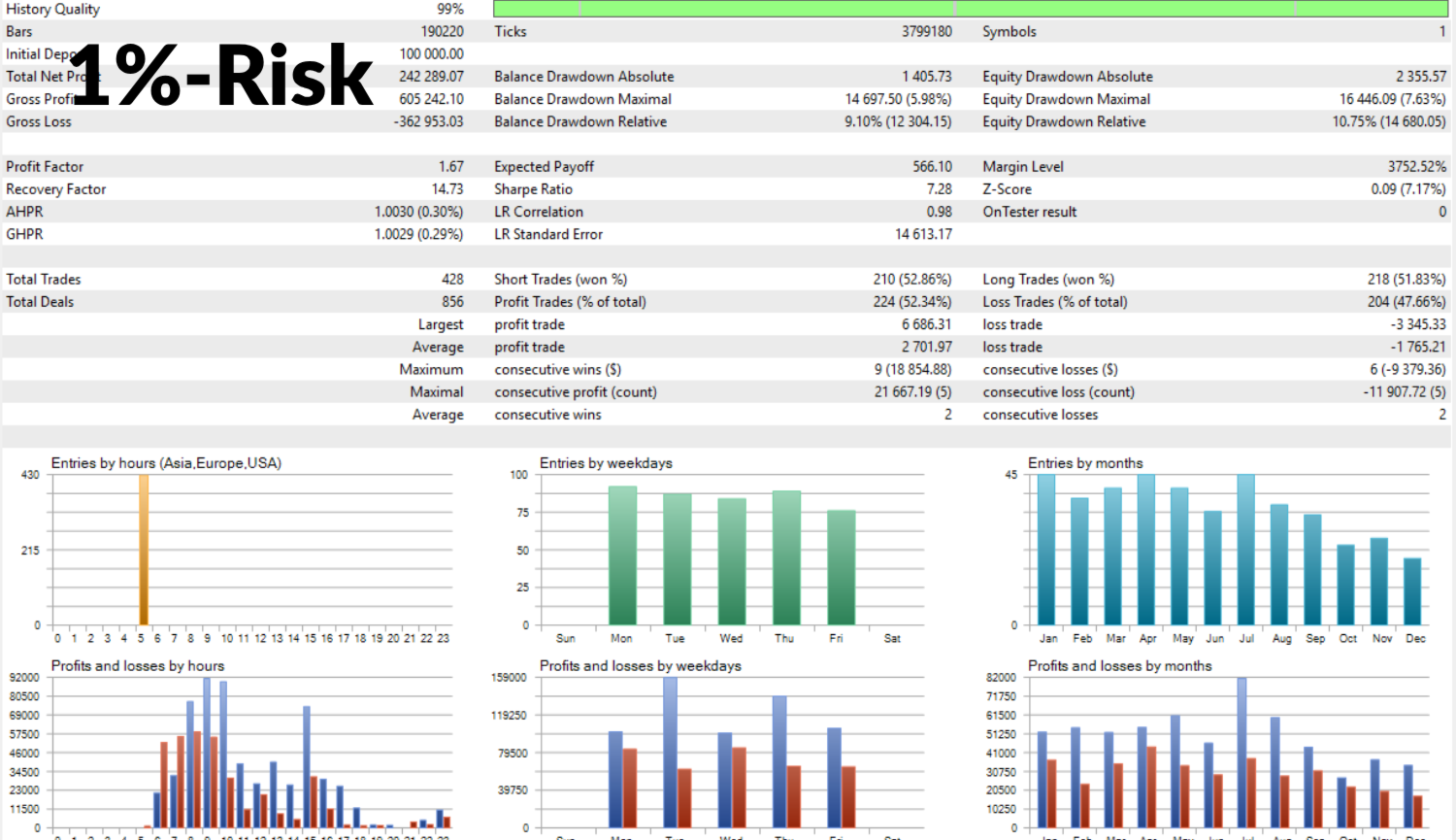
Historical Strategy Tester report with 1% risk per trade: trade statistics, drawdowns and the distribution of results.
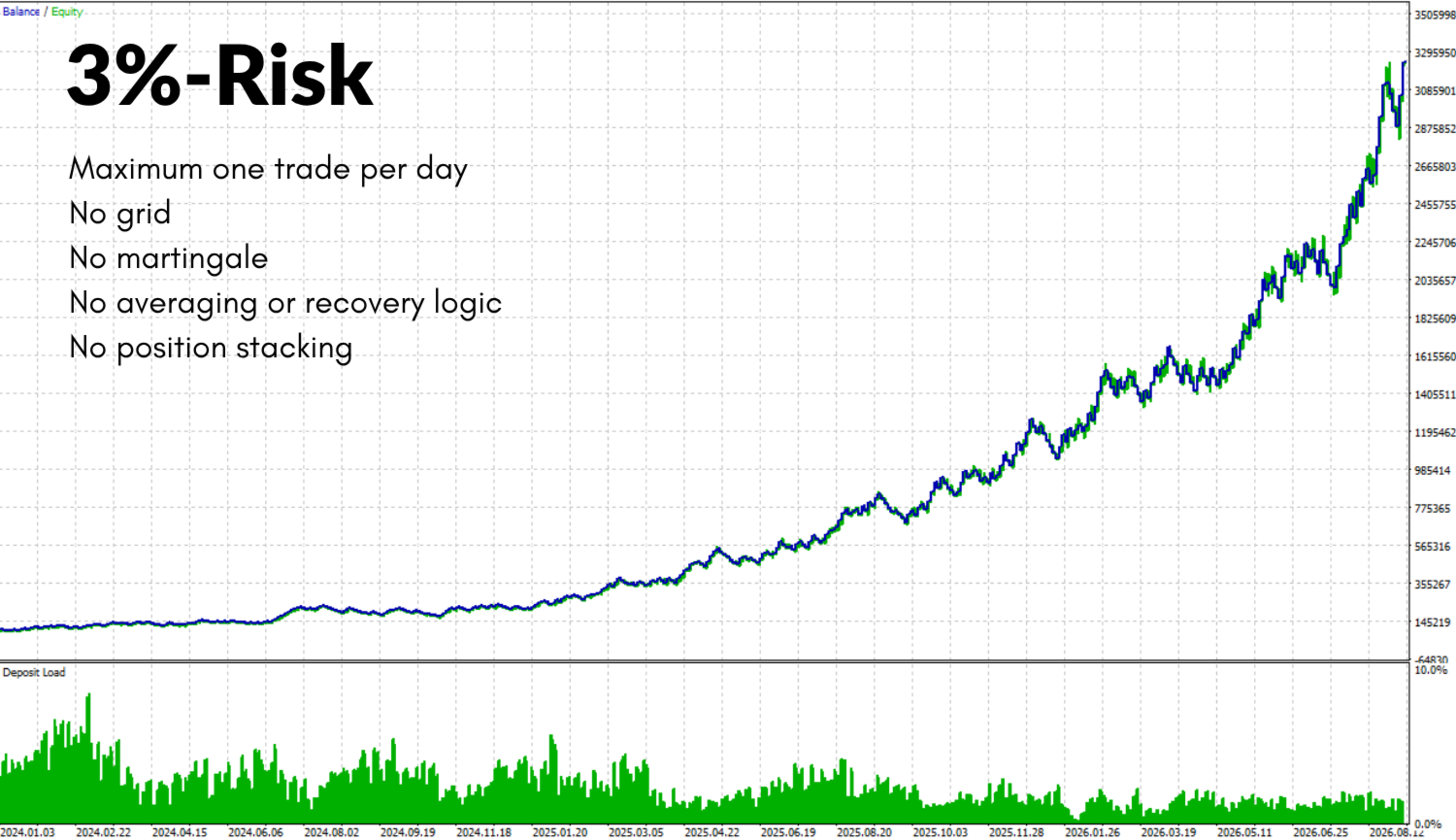
Historical MT5 test with 3% risk per trade. Balance, equity and deposit load show the development over the test period.
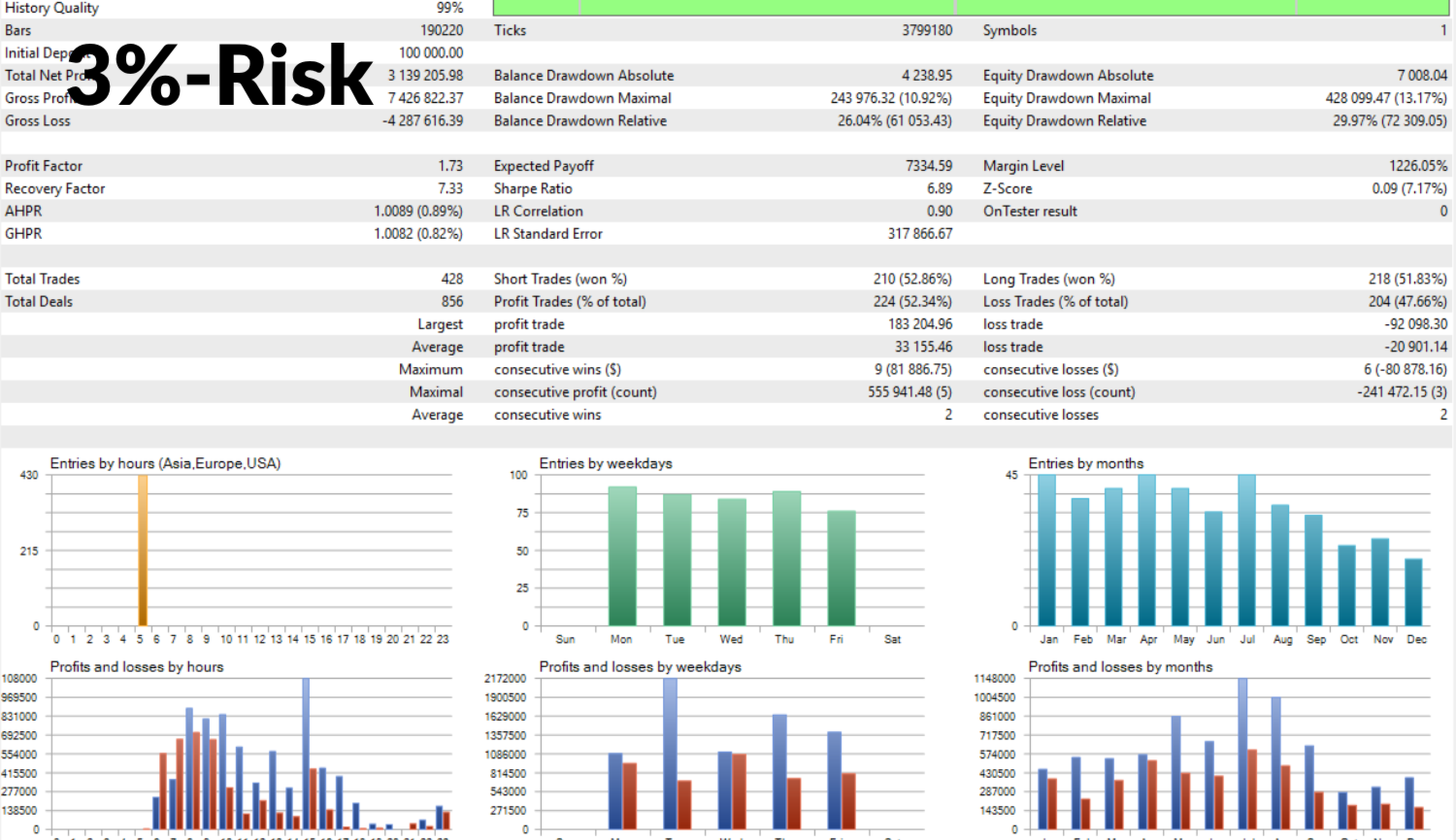
Historical Strategy Tester report with 3% risk per trade: trade statistics, drawdowns and the distribution of results.
Backtest detail 1 of 5
Swipe for more backtest details
Historical backtest, not live performance or a forecast. Broker data, spread, slippage, fees and settings affect results. Although XAU Pulse uses the exact same trading logic as the TradingView and NinjaTrader versions, executions can differ across platforms and broker feeds.
No external DLLs, no complex API bridges: download and install XAU Pulse directly through the built-in Market tab inside your MetaTrader 5 terminal.
Open the official MQL5 listing, download the free demo for the MT5 Strategy Tester if you want to inspect it first, and purchase your license through your MQL5 account.
Install the EA with one click via the Market window in MetaTrader 5, attach it to your XAUUSD M5 chart, and enable “Algo Trading”.
Verify your broker’s server time, entry window, and preferred risk mode. Test your configuration in the Strategy Tester and on a demo account first.
Get the MT5 version directly from the official MQL5 Market, where you can also download the free Strategy Tester demo first. Purchase, download, and license activation are handled securely through your MQL5 account.
Note for existing customers: The MT5 license is purchased separately through the MQL5 Market. Existing TradingView or NinjaTrader access does not unlock the MT5 version.
METATRADER 5 · EXPERT ADVISOR
$299USD
One-time purchase via MQL5 (no subscription)
Current one-time price listed on the MQL5 Market. The price and licensing terms shown in the official MQL5 listing apply.