Impact-Site-Verification: 70274732-2ab4-45ae-805a-4d265fce480b

    MMplatinum EMA + VWAP Trend.
    Trend & VWAP traded automatically.

    Local trend, higher-timeframe context and session VWAP — executed automatically as one rule set. Combines short-term EMA structure, higher-timeframe direction and session VWAP for automated Nasdaq Futures execution in NinjaTrader 8.

    Compare Single vs. Suite
    Market
    Nasdaq Futures (MNQ)
    Timeframe
    5 min. + HTF context
    Focus session
    Asian–London
    Execution
    Fully Automated (NinjaScript)
    Win Rate
    50%
    Profit Factor
    1.45
    Avg. RRR
    1.47
    Total Trades
    344
    Max. Drawdown
    $5,562.50

    Standard & Micro contracts (GC/MGC or NQ/MNQ) · Sim101 & Prop-ready · Historical reference backtest ($500 risk/trade, pre-fees/slippage), not a forecast.

    TRADING CONCEPT & FILTER LOGIC

    What the strategy looks for.
    And when it stays flat by design.

    EMA + VWAP Trend does not trade isolated crossovers. It places short-term Nasdaq movement within a broader trend context and uses the session VWAP as an additional reference for whether direction and market structure are aligned.

    1. 01

      Read the local trend structure

      The short-term EMA structure indicates whether current price action has a clear directional bias.

    2. 02

      Confirm the higher timeframe

      A local impulse is only considered when it fits the higher-timeframe context.

    3. 03

      Use VWAP as a session reference

      The session VWAP helps separate aligned trend setups from moves that lack sufficient confluence.

    Protected rulebook with transparent logic

    This overview transparently explains the core market mechanics of the strategy. Exact numerical thresholds, internal filter combinations, and the underlying entry/exit source code remain encapsulated to protect system integrity.

    AUTOMATED WORKFLOW IN NINJATRADER 8

    A rulebook that does more than signal.
    It executes with precision.

    Once enabled on your chart, the strategy processes every validation step in the exact same objective sequence — without hesitation or emotional interference.

    1. 01

      Determine trend context

      Higher-timeframe direction, local EMA structure and session VWAP define the permitted trade direction.

    2. 02

      Wait for confluence

      The strategy only acts when all required conditions align within the same setup.

    3. 03

      Manage orders automatically

      Entry, protective stop, target and session close are managed according to the configured logic.

    PREFER MANUAL CHART EXECUTION?

    This rulebook is also available as a TradingView indicator.

    If you prefer analyzing this exact setup visually in TradingView and placing orders manually with your broker, you can explore the indicator version here.

    View TradingView Indicator

    HISTORICAL REFERENCE BACKTEST

    How the rulebook performed.
    Cumulative results in historical testing.

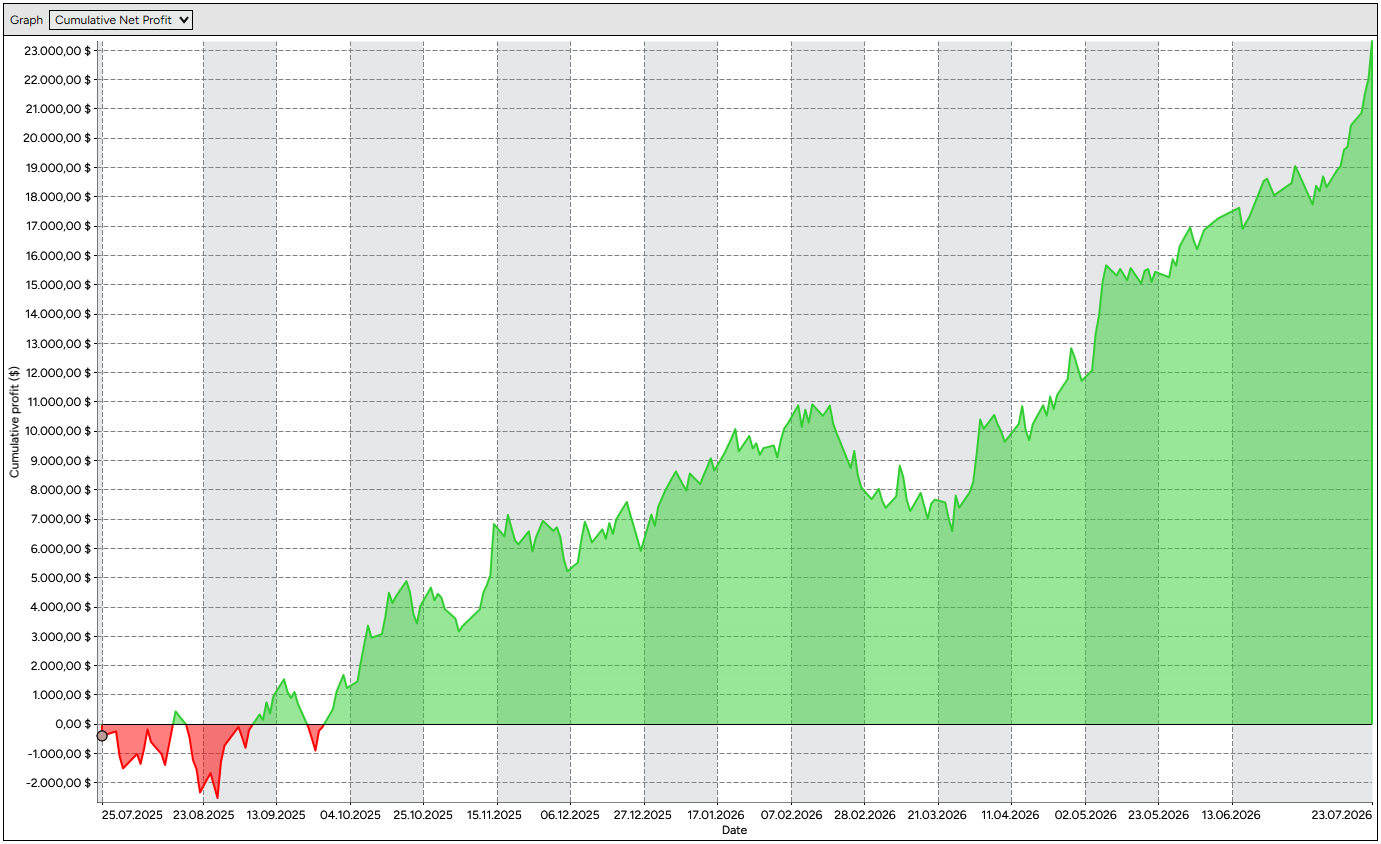
    The cumulative equity curve and key metrics show how the unchanged rulebook behaved in Nasdaq over the approx. 1-year evaluation period.

    MMplatinum EMA + VWAP Trend · Cumulative backtest performance

    Reference backtest (approx. 1 year) · $500 stop risk per trade

    Long-term cumulative backtest results for the MMplatinum EMAs and VWAP Trend indicator
    Win Rate
    50%
    Profit Factor
    1.45
    Avg. RRR
    1.47
    Total Trades
    344
    Max. Drawdown
    $5,562.50

    Reference backtest of the underlying trading logic assuming a $500 stop risk per trade. Maximum drawdown is based on the closed-trade equity curve. Results in NinjaTrader may vary depending on data feed, contract, fill model, slippage, commission, and settings. Historical results do not guarantee future performance.

    CONTROL, REQUIREMENTS & SAFE START

    You define the risk boundaries.
    Test in Sim101 first, then deploy.

    Automation replaces emotional execution mistakes — never your responsibility as risk manager. You control the account, contract limits, and risk parameters, and can disable the strategy at any time.

    Included with strategy access & user-configurable

    • EMA, HTF and VWAP context in one strategy
    • Automated order and exit management
    • Configurable risk and session parameters
    • Personal license activation
    • Customizable in settings: Account and contract
    • Customizable in settings: Risk and position size
    • Customizable in settings: Session and strategy parameters

    Requirements for running in NinjaTrader 8

    • NinjaTrader Desktop version 8.1.5.0 or newer (Windows PC or Windows VPS)
    • Active brokerage or market-data connection for the instrument (e.g., NinjaTrader / Tradovate, Rithmic, CQG, or Interactive Brokers)
    • Built-in simulation account (Sim101) to test all parameters risk-free before live deployment

    Do not have NinjaTrader 8 installed yet?

    Visit NinjaTrader 8 (Partner Link)

    Transparency notice: Partner/affiliate link. If you sign up or use services through this link, we may receive a commission at no additional cost to you.

    01

    Import the add-on

    Import the provided ZIP package in NinjaTrader 8 via Tools → Import → NinjaScript Add-On.

    02

    Verify connection & session

    Check your market data feed, instrument (e.g., MGC/GC or MNQ/NQ), trading hours template, and account assignment.

    03

    Observe in Sim101

    Verify entries, dynamic position sizing, and stop behavior under live market conditions in your simulation account first.

    04

    Deploy live consciously

    Only enable the strategy on a live or prop account once you have thoroughly verified its behavior and risk settings.

    ACCESS & PRICING

    Single strategy or
    the complete suite.

    Unlock this individual strategy or choose the Complete Strategy Suite with all three uncorrelated trading systems.

    All prices in USD ($). Secure billing and license management via Lemon Squeezy.

    THIS STRATEGY INDIVIDUALLY

    MMplatinum EMA + VWAP Trend

    Targeted license activation for this NinjaTrader 8 strategy, including automated order execution, stop management, and all future updates.

    $297one-time · Lifetime

    Single one-time payment with no recurring fee — equivalent to roughly 6 months of the monthly plan ($49/mo).

    • Personal NinjaTrader 8 license for this strategy
    • Automated setup validation, position sizing & order management
    • Full access for Strategy Analyzer, simulation (Sim101) & live trading
    • Customizable risk per trade & maximum contract limits
    • Secure ZIP download, setup guide & all future updates included

    In the next step you enter your NinjaTrader email and choose between monthly or lifetime access at checkout.

    ALL 3 STRATEGIES INCLUDED

    RECOMMENDED

    Complete Strategy Suite (All 3 Strategies)

    Combine XAU Momentum, EMA + VWAP Trend, and HTF EMAs + IFVG for a diversified system portfolio across Gold and Nasdaq.

    $697one-time · Lifetime

    Save $194 compared to three individual lifetime licenses ($891) — pay once, use permanently.

    • All 3 NinjaTrader 8 strategies unlocked in one package
    • Gold (GC/MGC) + Nasdaq (NQ/MNQ) combined in one portfolio
    • Near-zero daily correlation across the three trading logics
    • Run individually or in parallel across Sim, prop & live accounts
    • Includes all future improvements & strategy updates

    In the next step you enter your NinjaTrader email and choose between monthly or lifetime access at checkout.

    Risk disclosure: Trading futures and leveraged instruments carries a high level of risk and may not be suitable for all investors. Historical backtests or simulated results do not guarantee future profits. You remain fully responsible for strategy activation, connectivity, risk parameters, and account management.

    Frequently asked questions about
    this strategy.

    Yes. You can run the strategy on either the standard contract (e.g., GC or NQ) or the corresponding Micro contract (MGC or MNQ). Micro futures are especially convenient for finer position-size scaling on smaller accounts.

    In the strategy parameters you configure your desired dollar risk per trade along with a maximum contract limit. Whenever a valid setup forms, the strategy automatically calculates the contract quantity from the required stop-loss distance.

    Yes, and we strongly recommend it. After importing the ZIP add-on, you can evaluate historical data in the NinjaTrader Strategy Analyzer and run the strategy risk-free in your Sim101 account under real-time market conditions.

    If you close a position manually or a stop is hit, the strategy detects the updated account position and automatically cancels any remaining target or stop orders.

    Yes. Because NinjaTrader 8 strategies execute locally inside your running NinjaTrader instance, the platform must remain open and connected to your broker or data feed during active session hours. Many traders use a dedicated Windows VPS for uninterrupted connectivity.

    Technically, the strategy can run on any account connected through a broker or data feed supported by NinjaTrader 8 — including NinjaTrader Brokerage, Tradovate, Rithmic, CQG, or Interactive Brokers. If you trade with a prop firm, please verify beforehand in their rules that automated NinjaScript strategies are permitted.

    Before checkout, you enter your NinjaTrader account email address. After purchase, your personal license is assigned and you receive the download link for the NinjaScript add-on (.zip) along with step-by-step setup instructions via email.

    Yes. With the monthly plan you can switch at any time — if you later want to move from a single lifetime strategy to the Complete Strategy Suite, simply email info@mmplatinum.de beforehand. If you already plan to combine multiple markets (Gold + Nasdaq), starting directly with the Complete Strategy Suite offers the best overall value.

    READY FOR RULE-BASED EXECUTION?

    Start with this strategy.
    Or unlock all three systems in the Suite.

    Test the rulebook thoroughly in your NinjaTrader simulation account (Sim101) first and choose between flexible monthly access or a one-time lifetime license.