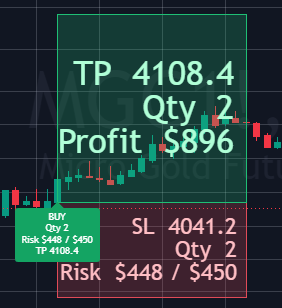
Trade Setup
Entry, stop, target and position size shown as one connected trade plan.
How do you want to trade?
Choose manual or automated execution.
Three rule-based TradingView indicators for Futures and CFDs validate market context and setup conditions, calculate position size and risk, and visualize your trade plan directly on the chart.
A complete system, not isolated signals
Every indicator connects signal, risk planning, trade management and performance review in one continuous workflow.
Entry, stop, target and position size shown as one connected trade plan.
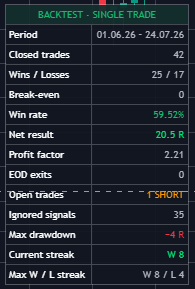
Key performance figures for your selected configuration.
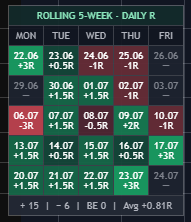
Results broken down by day and market phase.
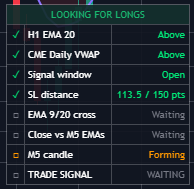
Track every condition live and receive an alert when a potential setup is forming.
Every parameter can be adjusted to suit your approach. The default settings come from the respective long-term backtest, giving you a tested place to start.
Once confirmed at candle close, signals remain unchanged.
The difference that matters
A typical signal tool marks a moment on the chart. MMplatinum brings signal, context, risk, position size, trade plan and performance review together.
Typical signal tool
01Marks a possible entry.
MMplatinum Indicators
Shows which conditions are met and which market context is currently in place.
Typical signal tool
02Risk and position size still require separate manual work.
MMplatinum Indicators
Calculates position size directly from your chosen risk model.
Typical signal tool
03Stop, target and trade management are planned separately.
MMplatinum Indicators
Displays entry, stop, target and active trade management as one connected workflow.
Typical signal tool
04Results must be reviewed outside the chart.
MMplatinum Indicators
Includes a backtest table, performance calendar and the metrics that matter.
Typical signal tool
05Configuration starts without a tested reference point.
MMplatinum Indicators
Provides fully adjustable presets taken from the respective long-term backtest.
You do not just see that a setup is forming. You see why it qualifies, how much risk is planned and how the trade is structured.
The three indicators
Gold Futures · Momentum Setup
Originalansicht · TradingView
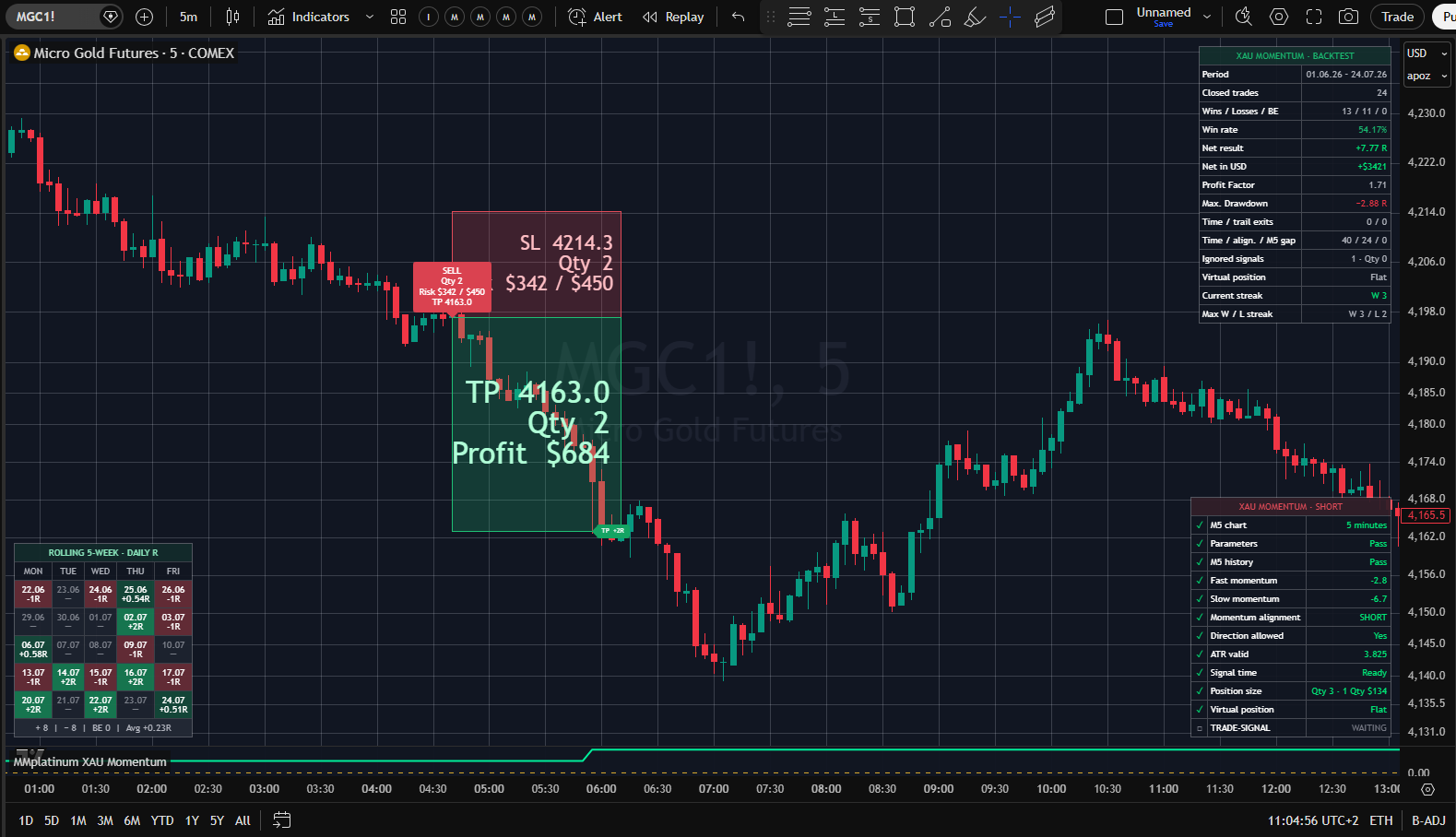
The same trading window every day. One clear check. A signal only appears when the full setup is in place.
Every trading day, the indicator checks the same defined time window for a complete momentum setup. It only highlights a potential trade when every condition is met.
Markets
Gold Futures
Timeframes
5-minute chart
Primary session
Asian
Nasdaq Futures & CFDs · EMA and VWAP Confluence
Originalansicht · TradingView
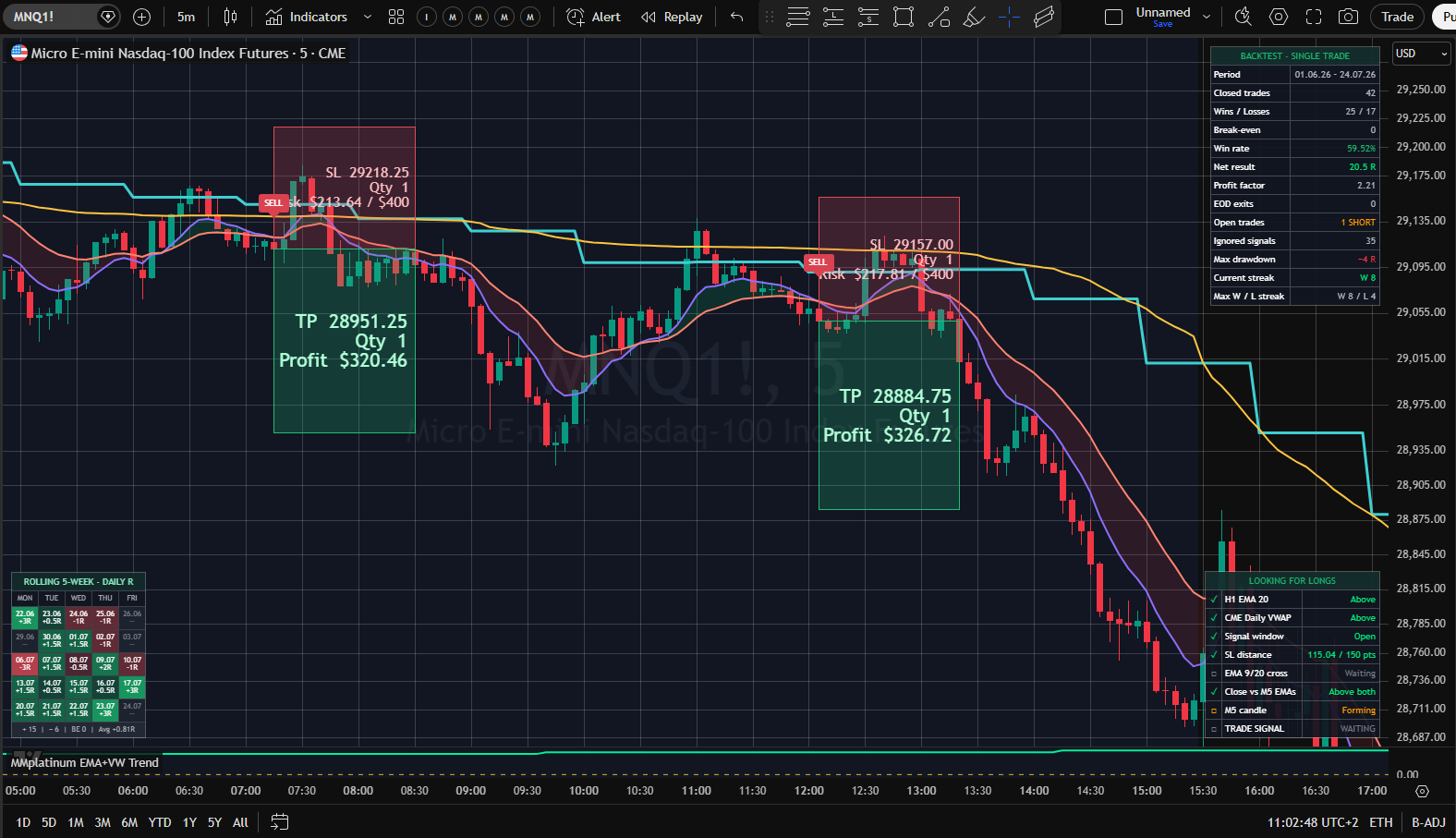
A possible signal is not enough. What matters is whether it agrees with the higher-timeframe trend and the active session.
A rule-based intraday indicator for Nasdaq Futures and corresponding Nasdaq CFDs that combines the local EMA structure with the higher-timeframe trend and session VWAP.
Markets
Nasdaq Futures · Nasdaq CFDs
Timeframes
5 min. + HTF context
Primary session
Asian – London
Nasdaq Futures & CFDs · HTF EMA and IFVG Setup
Originalansicht · TradingView
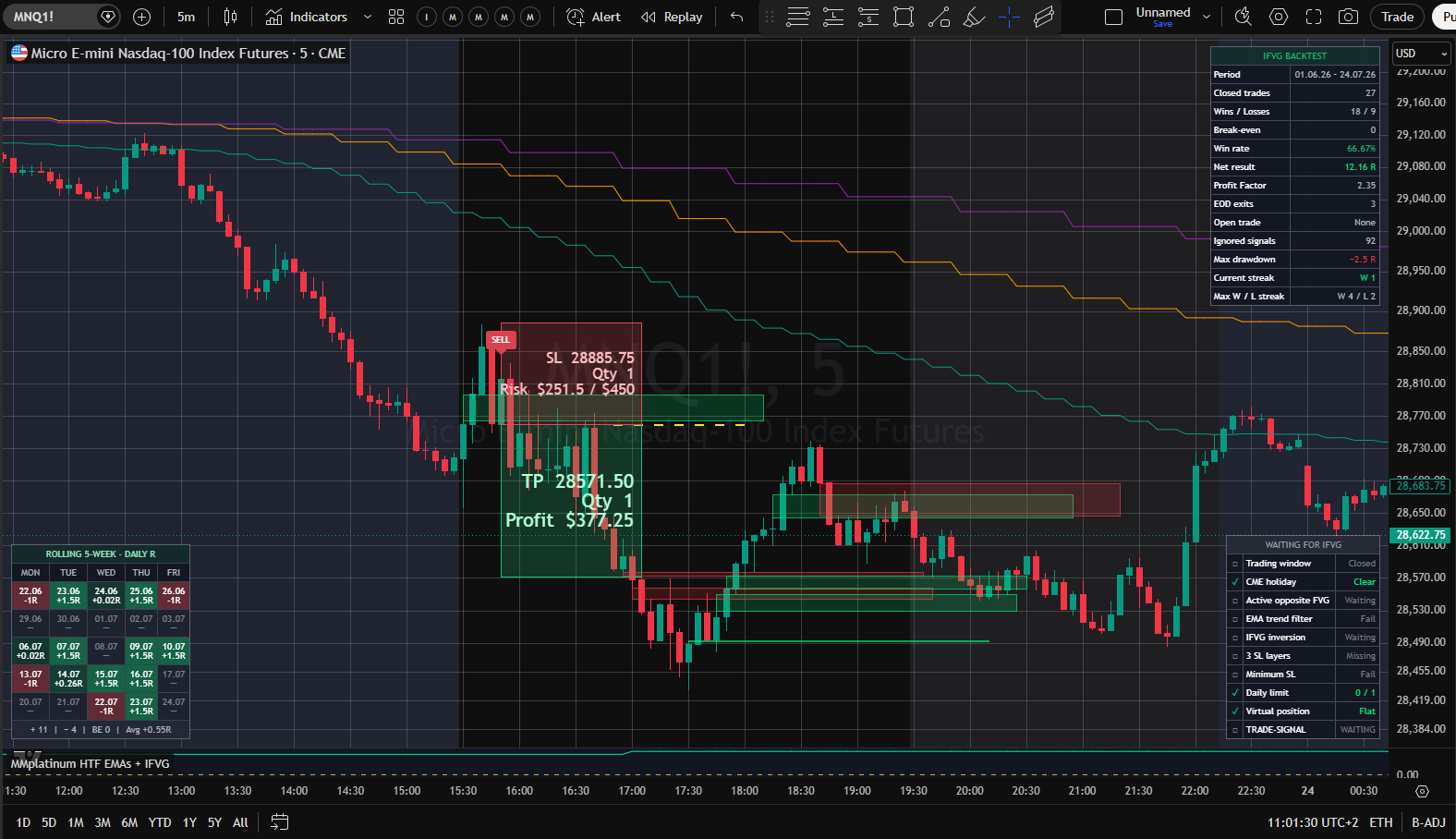
An FVG zone alone is not a setup. What matters is whether the session and higher-timeframe trend confirm it.
A rule-based indicator for Nasdaq Futures and corresponding Nasdaq CFDs that combines Fair Value Gap structures with trend context from multiple higher timeframes.
Markets
Nasdaq Futures · Nasdaq CFDs
Timeframes
5 min. + HTF context
Primary session
New York
Prefer automated execution?
Let NinjaTrader validate the setup, place orders and manage the trade according to the configured rules.
Why the Complete Suite works
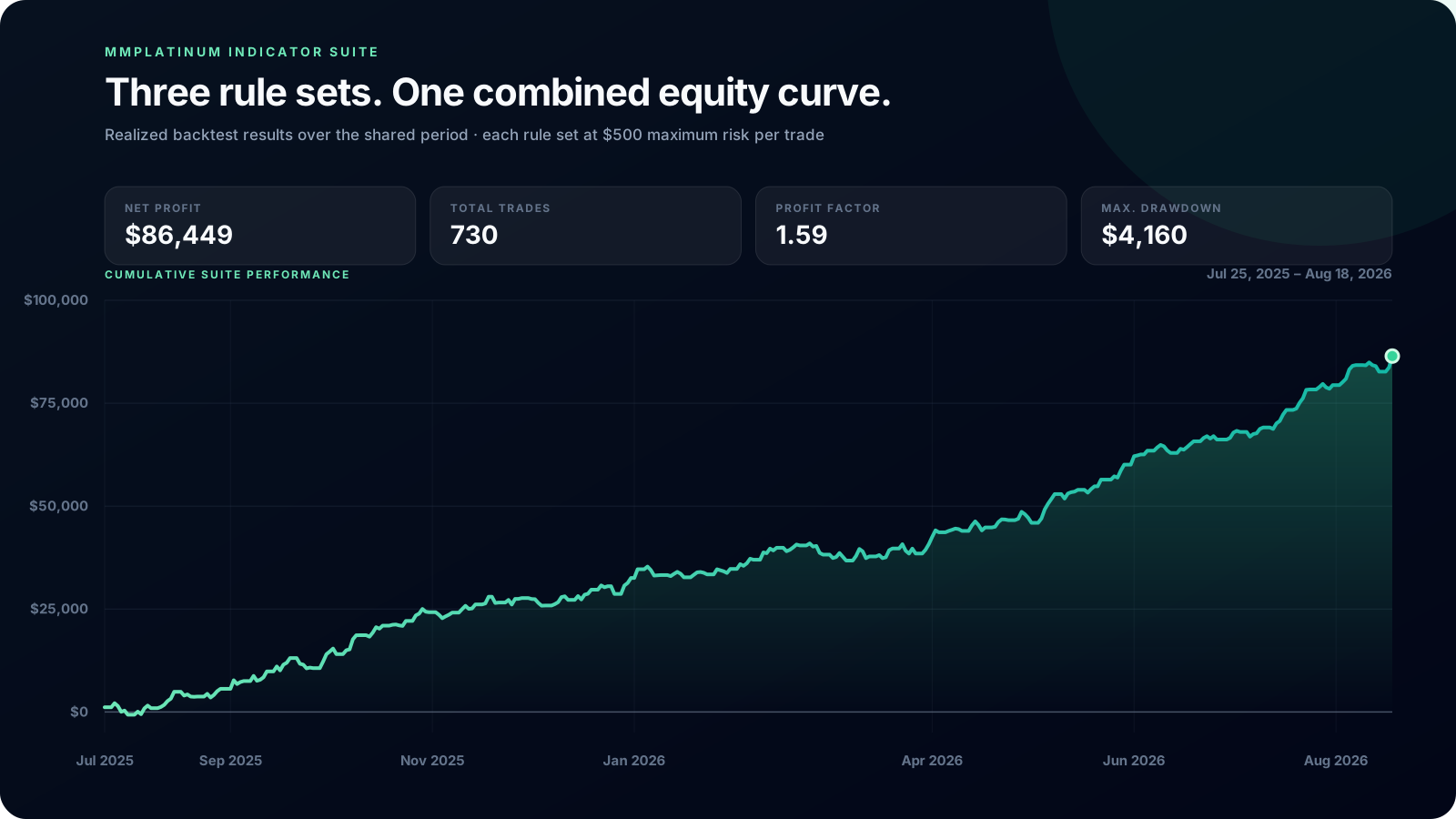
Different markets, setups and trading sessions keep the daily results of the three indicators largely independent in the combined backtest.
MMplatinum Indicator Suite
Net profit
$86,449
Total trades
730
Profit factor
1.59
Max. drawdown
$4,160
Cumulative Suite performance
Cumulative total of all 730 closed backtest trades over the shared period. Each rule set was configured with a maximum risk of $500 per trade. Slippage, fees and subsequent manual execution can change the result.
Average
−0.03
XAU Momentum × EMAs + VWAP
+0.06
XAU Momentum × HTF EMAs + IFVG
−0.14
EMAs + VWAP × HTF EMAs + IFVG
+0.01
These figures come from the actual combined curve. All three trading concepts remained unchanged at a maximum risk of $500 per trade. No scaling or risk normalization was applied.
730
Closed trades
3 trading concepts · $500 maximum risk each
$4,160
Maximum Suite drawdown
3 trading concepts · $500 maximum risk each
Analysis of backtest results from July 25, 2025 to August 18, 2026. The combined results cover all three trading concepts, with 730 closed trades and a maximum Suite drawdown of $4,160. Each concept remained unchanged at a maximum risk of $500 per trade. Historical results do not guarantee future performance.
Invite-only access
Access is enabled directly for your TradingView account. The Pine source code remains protected, and there is nothing to download or install.
Select one indicator or the Complete Suite.
We need your exact TradingView username to activate personal access.
Once payment has been verified, invite-only access is enabled for your account.
You will find it in TradingView under “Indicators” and “Invite-only Scripts”.
Start with the tested presets, adjust risk and parameters, and enable alerts if required.
Flexible access
Stay flexible with monthly billing or save nearly 50% versus twelve monthly payments with an annual plan.
One Indicator
Monthly access
Annual access
Save 47% · equivalent to $20.58 per month
Choose monthly or annual billing in the next step.
Complete Suite
Monthly access
Annual access
Save 50% · equivalent to $49.75 per month
Choose monthly or annual billing in the next step.
Trading involves risk. Indicators and backtests do not guarantee future results and do not constitute investment advice.