01
Monitor market and session
The strategy processes the required market data and waits for its intended trading context.
How do you want to trade?
Choose manual or automated execution.
Three futures strategies built for NinjaTrader validate market context and setup conditions, place orders and manage the trade according to a clearly defined rule set.
From setup to exit
You choose the account, risk limit and trading hours. NinjaTrader handles the ongoing monitoring, setup validation and execution.
The strategy processes the required market data and waits for its intended trading context.
A trade only qualifies after every condition of the selected strategy has been met.
Order quantity follows your selected account and risk settings.
Entry, protective stop, target and additional management rules are handled automatically.
Why automated execution
An automated strategy does not become impatient, tired or swept up by a fast market move. It follows the defined rule set – even when you are not sitting in front of the chart.
Entries and exits follow your configured conditions, rather than fear, excitement or the impulse to immediately win back a loss.
NinjaTrader monitors the market and setup continuously while the platform, data connection and strategy remain active. You do not have to wait for every candle.
When a configured trading session falls overnight or while you are busy elsewhere, the strategy can validate setups and execute orders without you at the screen.
The strategy does not chase a missed move or add trades out of boredom. Without a valid setup, it does not place a strategy trade.
Automation does not mean unattended trading. You remain responsible for risk, account connectivity, strategy parameters and technical monitoring.
Three trading systems
One defined daily window. One complete rule check. Fully automated execution.
The NinjaTrader strategy validates the XAU Momentum setup during its defined trading window and handles rule-based order execution and trade management when a valid signal occurs.
Market
Gold Futures (MGC)
Timeframe
5-minute chart
Primary session
Asian
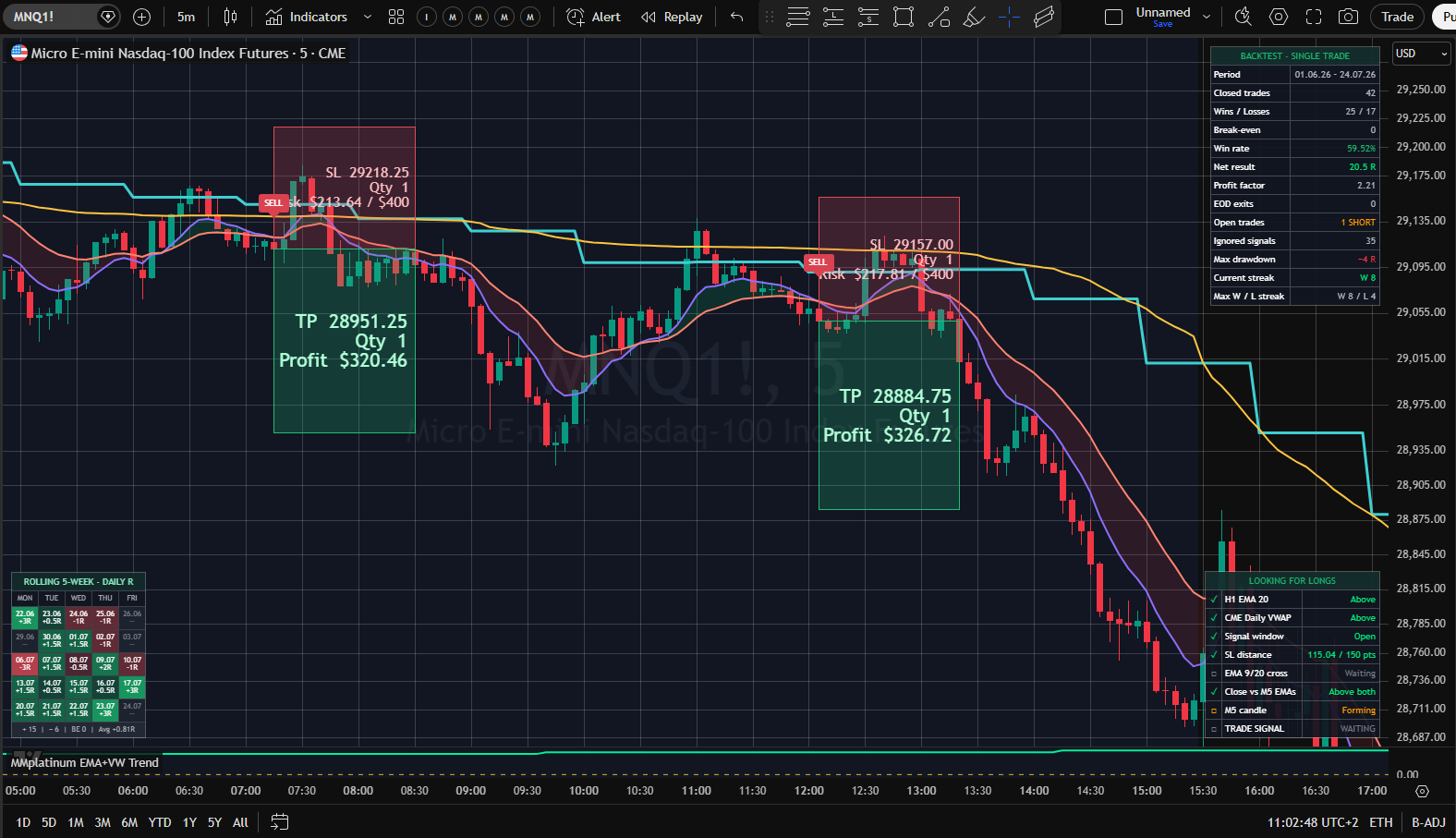
Local trend, higher-timeframe context and session VWAP — executed automatically as one rule set.
The strategy combines short-term EMA structure with higher-timeframe direction and the session VWAP. Only aligned trend setups qualify for automated execution.
Market
Nasdaq Futures (MNQ)
Timeframe
5 min. + HTF context
Primary session
Asian–London
Not every FVG is a trade. The strategy waits for IFVG, session and confirmed HTF direction.
The strategy qualifies FVG and IFVG structures using multiple higher-timeframe EMAs and automates execution only within its defined New York rule set.
Market
Nasdaq Futures (MNQ)
Timeframe
5 min. + HTF context
Primary session
New York
Prefer manual execution?
Review setup, risk and trade plan directly on the chart, then decide whether and when to execute the trade yourself.
Why the Strategy Suite works
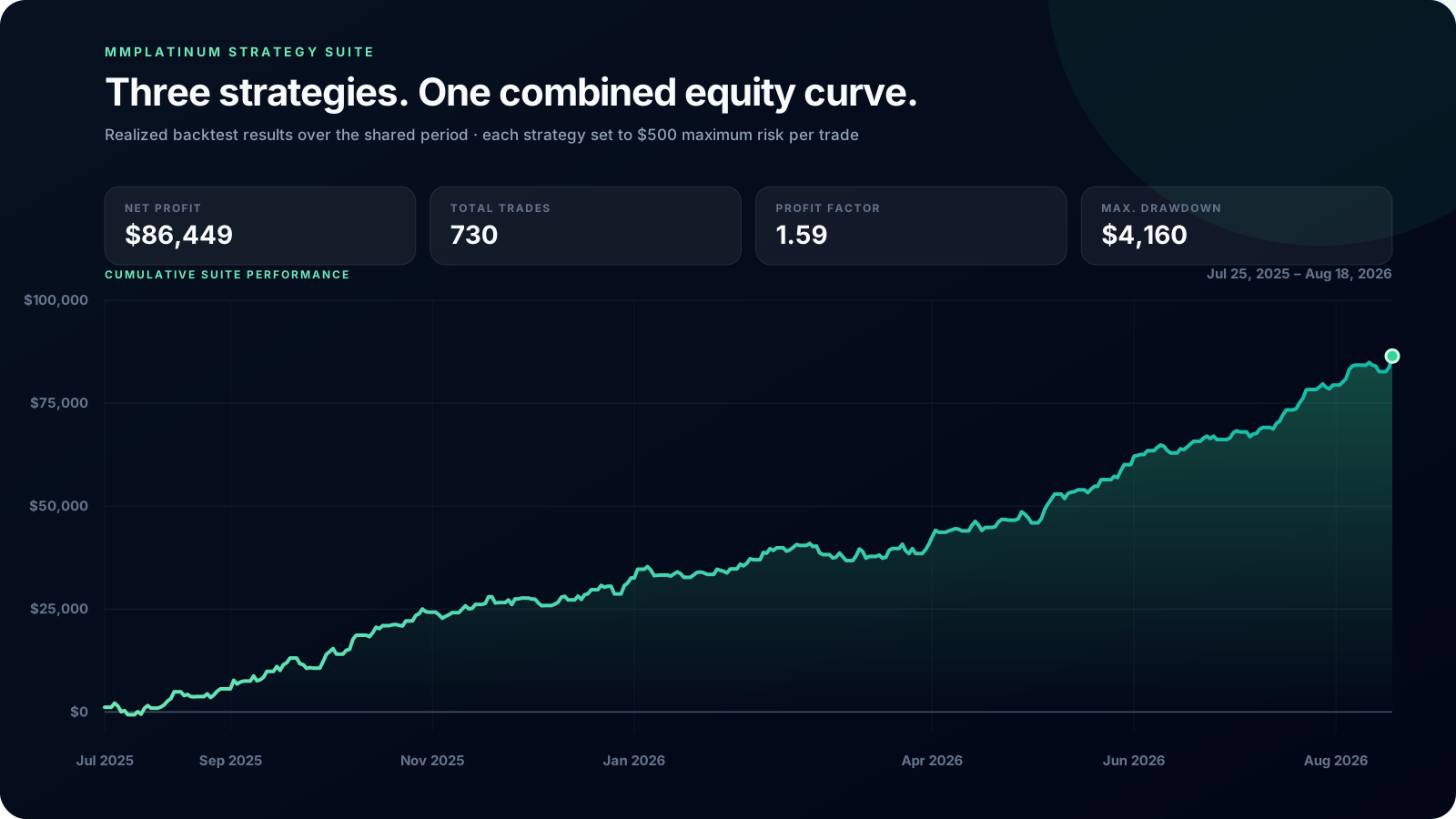
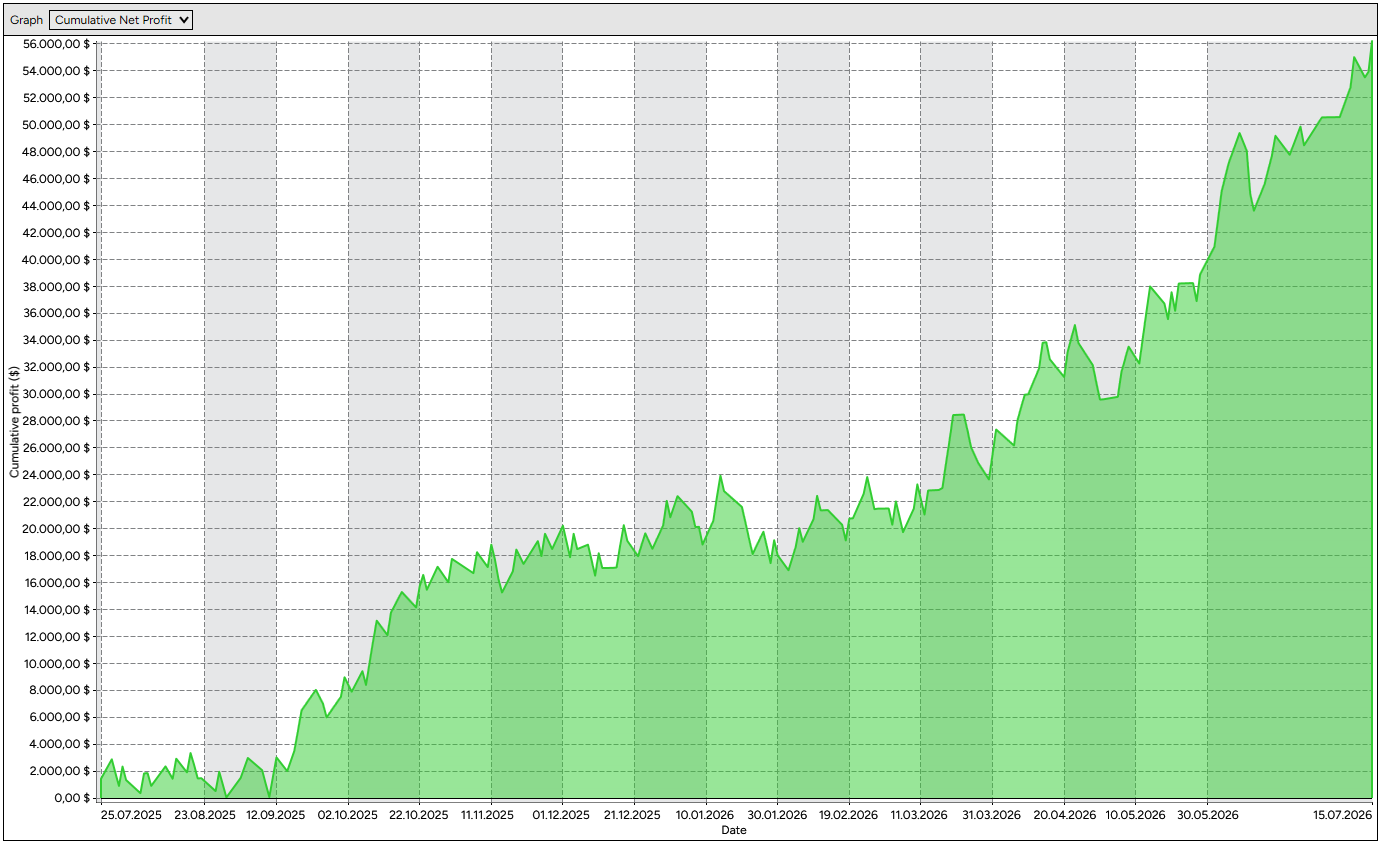
The daily results of the three strategies showed low correlation in the combined reference backtest. This observation applies to the period studied.
MMplatinum Strategy Suite
Simulated historical backtest results
July 25, 2025 – August 18, 2026 · Commissions set to zero
Backtest result
$86,449
Total trades
730
Profit factor
1.59
Backtest drawdown
$4,160
Cumulative Suite performance
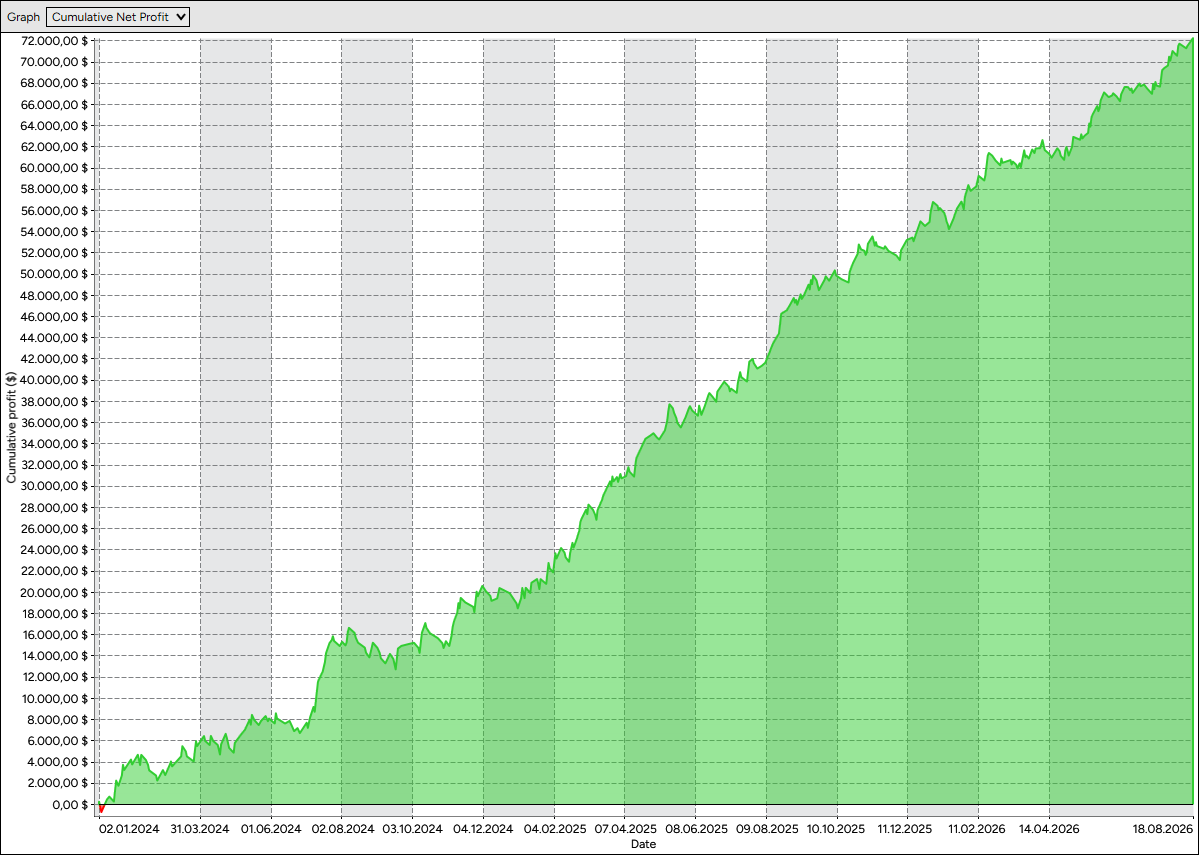
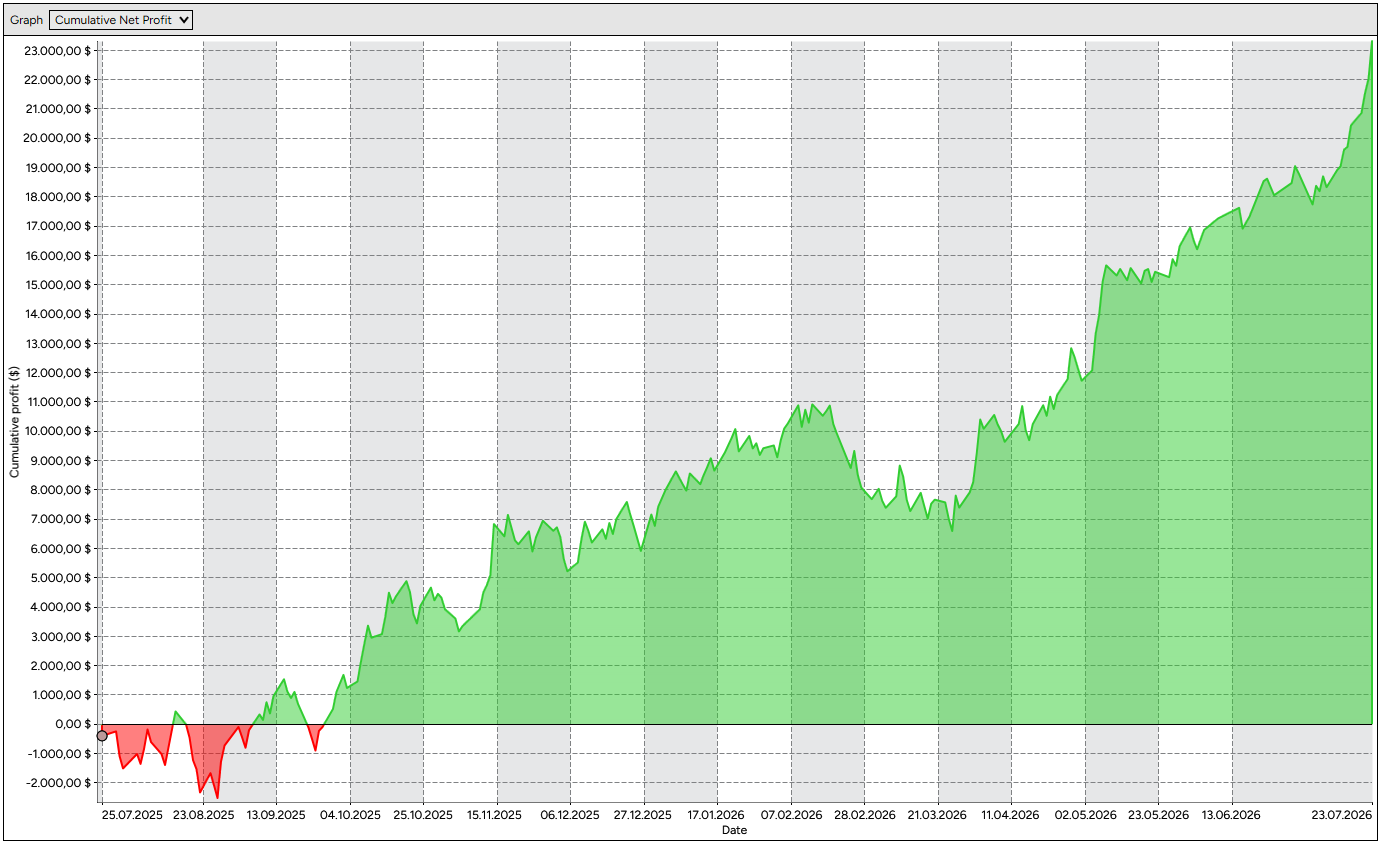
Cumulative total of all 730 closed backtest trades over the shared period. Each strategy was configured with an assumed stop risk of $500 per trade. Slippage, fees and live execution can change the result. Commissions were set to zero in the exports. Actual losses can exceed the assumed stop risk.
Average
−0.03
XAU Momentum × EMA + VWAP
+0.06
XAU Momentum × HTF EMAs + IFVG
−0.14
EMA + VWAP × HTF EMAs + IFVG
+0.01
These figures come from the combined historical backtest curve. All three strategies remained unchanged at an assumed stop risk of $500 per trade. No scaling or risk normalization was applied.
730
Closed trades
3 strategies · $500 assumed stop risk each in the backtest
$4,160
Maximum Suite drawdown
3 strategies · $500 assumed stop risk each in the backtest
Analysis of NinjaTrader backtest results from July 25, 2025 to August 18, 2026. The combined results cover all three strategies, with 730 closed trades and a maximum drawdown of $4,160. Each strategy remained unchanged at an assumed stop risk of $500 per trade. Historical results do not guarantee future performance.
Why NinjaTrader
NinjaTrader Desktop version 8.1.5.0 or later runs NinjaScript strategies natively, provides historical testing in Strategy Analyzer and supports a range of brokerage and data connections, depending on your account, license and provider.
Strategies can be enabled and monitored from a chart or the dedicated Strategies tab.
Test parameters and historical results in NinjaTrader’s dedicated analysis environment.
Use supported brokerage and data connections that fit your futures setup.
Configure the strategy on a simulation account first and validate data, instrument and order behavior.
NinjaTrader connection options
Broker & data feed
NinjaTrader
Automated strategy
Connection availability depends on your NinjaTrader account, license, broker and data provider. A brokerage or market-data connection is not included with the strategy purchase.
Use our partner link to learn more about the platform, account options and available futures connections directly from NinjaTrader.
Explore NinjaTraderAffiliate link: We may receive a commission if you open an account or sign up through this link. There is no additional cost to you.
Personal activation
Select one strategy or the Complete Suite, either monthly or as lifetime access.
Use the email address connected to your NinjaTrader account in the purchase dialog.
Once payment is verified, we activate the personal license for your account.
You receive a secure, time-limited link to download the NinjaScript add-on.
Import the ZIP file into NinjaTrader Desktop and run the strategy in simulation first.
Monthly or lifetime
Choose monthly access or a one-time lifetime purchase in the Lemon Squeezy checkout.
One Strategy
Monthly access
Lifetime access
Lower total cost from month seven
Choose monthly or lifetime access in the next step.
Complete Strategy Suite
Monthly access
Lifetime access
Lower total cost from month six
Choose monthly or lifetime access in the next step.
Automated trading involves substantial risk. Backtests and simulations do not guarantee future results. Verify every strategy, connection and account setting before live use.
No. The add-ons were built as NinjaScript strategies for NinjaTrader and require NinjaTrader Desktop version 8.1.5.0 or later.
NinjaTrader supports different connectivity providers. Availability depends on your account, license, broker and data provider. Verify your connection before purchase and test it in simulation afterwards.
Once enabled, the strategy can automate setup validation, order placement and trade management. You remain responsible for the account, connection, parameters, risk and monitoring.
Yes. You can enable, disable and later restart the strategy in NinjaTrader. Before enabling it again, verify that the account, instrument and strategy position are synchronized — especially after a restart, connection interruption or manual intervention.
Yes. Using NinjaTrader’s “Close” function cancels the associated orders, closes the position and disables the strategy. Do not simply place a separate opposing order, as this can cause the strategy and account positions to fall out of sync. Before re-enabling, confirm that the account is flat and synchronized.
A VPS is not mandatory. However, NinjaTrader, your data and brokerage connections, and the computer running the platform must remain active for continuous monitoring and execution. A stable Windows VPS is useful if the strategy should run while your home computer is turned off.
Without a running and connected NinjaTrader instance, the strategy cannot process new market data or make further decisions. After any interruption, verify working orders, account position and strategy status before enabling it again.
Yes, in principle. You must account for the combined total risk and avoid uncontrolled overlap on the same account and instrument. Test the intended combination in simulation first.
Yes. You can configure and run a separate strategy instance for each account available in NinjaTrader. Account, risk and position size are defined per instance. Keep in mind that your actual total exposure increases with every additional account, and test the configuration on simulation accounts first.
After personal activation, we send a confirmation email with a protected download link. You then import the ZIP file into NinjaTrader.
Monthly access can be managed and canceled through the Lemon Squeezy customer portal. Lifetime access is a one-time purchase without recurring renewals.